Presenting Your Brand with Confidence Using an Office Meeting Room Logo Mockup
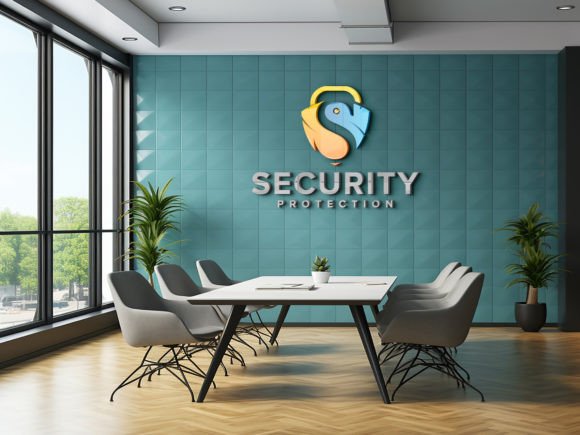
There is a distinct moment in every branding project where the digital design meets the physical world. You have spent hours perfecting the kerning, selecting the exact shade of blue, and ensuring your vector files are flawless. But when you present that flat, two-dimensional logo to a client or stakeholder, it often lacks context. It feels abstract. This is where an Office Meeting Room Logo Mockup becomes an indispensable tool for designers, marketers, and business owners alike. It bridges the gap between concept and reality, allowing viewers to visualize how a brand identity lives within a professional environment.
Using a high-quality mockup transforms a simple graphic into a tangible asset. By placing your logo on the glass partition of a modern conference room, you are not just showing a symbol; you are selling an atmosphere. You are demonstrating professionalism, permanence, and corporate presence. For many clients, seeing their logo integrated into a realistic architectural setting provides the emotional reassurance they need to sign off on a project. It shifts the conversation from "Do I like this shape?" to "Can I see my team working here?"
Why Context Matters in Brand Presentation
Human beings are visual creatures who rely on environmental cues to judge quality and trustworthiness. A logo floating on a white background is safe, but it is also sterile. When you utilize an Office Meeting Room Logo Mockup, you are leveraging the psychology of space. Glass walls, sleek furniture, and ambient lighting suggest transparency, modernity, and efficiency. These are attributes that most businesses want to associate with their brand.
Consider the difference between sending a PDF of a logo file versus presenting a photorealistic image of that logo etched onto the frosted glass of a boardroom door. The latter implies that the business is established and ready for operation. It helps stakeholders visualize the end result of their investment. This is particularly crucial for startups seeking funding or established companies undergoing a rebrand. The mockup serves as a proof of concept, reducing the cognitive load for the viewer and making the approval process smoother and faster.
Ideal Scenarios for Using Meeting Room Visuals
The versatility of these assets means they are useful across a wide spectrum of industries and situations. Understanding where to apply them can significantly enhance your workflow and client satisfaction.
- Corporate Rebranding Proposals: When pitching a new identity to a traditional corporation, showing the logo in a conservative, high-end meeting room setting can help ease the transition. It demonstrates respect for the existing corporate culture while introducing fresh elements.
- Co-working Space Marketing: Providers of shared office spaces often need to show potential tenants how their branding will look in communal areas. A realistic mockup allows them to create customizable marketing materials without needing to photograph every single unit.
- Interior Design Portfolios: Architects and interior designers can use these mockups to populate their renderings with realistic branding elements. It adds a layer of authenticity to their portfolios, showing how signage interacts with light and material.
- Freelance Designer Portfolios: For designers looking to attract high-ticket corporate clients, having case studies that feature realistic office applications signals that you understand the commercial application of design, not just the artistic side.
The Technical Advantage of Smart Object Integration
One of the most significant barriers to creating realistic mockups has always been technical skill. Traditionally, achieving the correct perspective, lighting, and shadow interaction required advanced knowledge of 3D rendering software or complex Photoshop manipulation. However, modern resources have democratized this process. With a template that features Smart Object Replacement, the technical heavy lifting is done for you.
This functionality allows you to simply double-click a layer, paste your logo, and save. The software automatically applies the necessary transformations. The logo will warp to match the angle of the glass, adjust its opacity to simulate etching or printing, and interact with the ambient light sources in the scene. This means that even if you have minimal photo-editing experience, you can produce results that look like they were captured by a professional photographer. The fully layered and well-organized folders ensure that you can tweak specific elements if needed, such as adjusting the brightness of the room or the intensity of the shadow, giving you 100% editable control without the headache.
Choosing the Right Mockup for Your Needs
Not all mockups are created equal, and selecting the right one requires attention to detail. When browsing for an Office Meeting Room Logo Mockup, consider the lighting conditions depicted in the preview. Is the room bright and airy, suggesting a creative tech startup? Or is it dimly lit with warm tones, suggesting a law firm or executive suite? The mood of the background should align with the brand personality you are trying to convey.
Resolution is another critical factor. Always look for files that offer 300 DPI quality. This ensures that whether you are using the image for a high-resolution print presentation or a crisp web display, the edges of your logo remain sharp and the textures of the glass and metal look authentic. A low-resolution mockup can make even the best logo design look amateurish. Additionally, check that the file format is PSD (Photoshop Document), as this preserves the layer structure necessary for easy editing.
Practical Tips for Best Results
To get the most out of your mockup, keep a few practical considerations in mind. First, ensure your source logo file is high quality. Since the mockup will reveal every detail, a pixelated or poorly vectorized logo will be obvious. Second, pay attention to color contrast. If the meeting room background is dark, a light-colored logo will pop effectively. Conversely, a dark logo might get lost against a shadowed glass pane. You may need to adjust the color mode of your logo within the smart object to ensure visibility.
It is also worth noting that while these tools are powerful, they are supplements to good design, not replacements for it. The mockup enhances the presentation, but the core strength lies in the logo itself. Use the realistic shadows and lighting to highlight the craftsmanship of your design, but do not rely on the environment to fix fundamental flaws in the logo’s composition.
Enhancing Your Professional Toolkit
Incorporating a reliable Office Meeting Room Logo Mockup into your regular workflow is a small change that yields substantial returns. It saves time, reduces client revision rounds, and elevates the perceived value of your work. By providing a clear, realistic vision of the final product, you build trust and confidence with your audience. Whether you are a seasoned agency director or a solo entrepreneur launching your first venture, the ability to visualize your brand in a real-world setting is a competitive advantage.
Remember, the goal is not just to display a logo, but to tell a story about the business it represents. A meeting room is a place where decisions are made, partnerships are formed, and futures are planned. Placing your brand in that context imbues it with significance. So, the next time you prepare a presentation, skip the flat JPEGs. Opt for a high-quality, 3D realistic mockup that brings your design to life. Your clients will appreciate the effort, and you will appreciate the ease of use provided by smart object technology. It is a simple switch that makes a profound difference in how your work is perceived and valued.