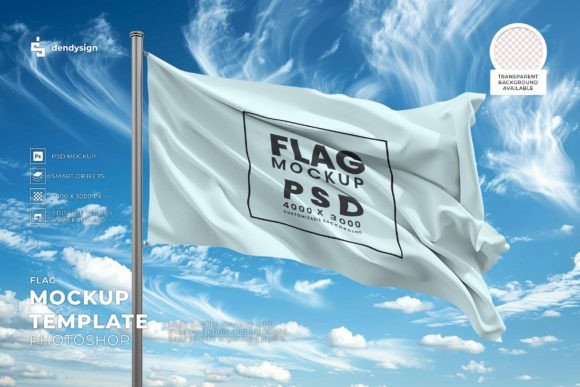
Mastering Brand Presentation with the Waving Flag Mockup Template in Photoshop
In the realm of graphic design and brand identity, static presentations often fail to capture the dynamic energy of a logo or emblem. This is where the Waving Flag Mockup Template becomes an indispensable tool for professionals seeking to elevate their visual storytelling. Unlike standard flat displays, this resource allows designers to showcase branding elements in a realistic, three-dimensional context that mimics the natural movement of fabric in the wind. By utilizing a high-quality PSD file, creatives can bridge the gap between digital concepts and tangible reality, providing clients with a compelling preview of how their brand will appear in physical spaces.
The primary appeal of the Waving Flag 3D Mockup Template lies in its ability to add depth and motion to otherwise stationary designs. When presenting a new corporate identity, event branding, or national symbol, seeing the design ripple across a flagpole creates an emotional connection that a simple JPEG cannot achieve. This template is specifically engineered for Adobe Photoshop, ensuring that users have access to powerful editing capabilities without needing to master complex 3D modeling software. The result is a professional-grade visualization that saves time while significantly enhancing the perceived value of the design work.
Evaluating the Technical Advantages of High-Resolution PSD Files
When selecting a mockup resource, technical specifications are paramount. The Waving Flag Mockup Template distinguishes itself through its high-resolution structure, which is critical for both digital portfolios and print-ready presentations. A low-resolution mockup may look acceptable on a small screen but fails when scaled up for large-format displays or detailed client reviews. This template ensures that every fold, shadow, and highlight remains crisp, preserving the integrity of the original artwork.
One of the most significant benefits of this format is the use of organized layers. For designers who value efficiency, having a well-structured PSD file means less time searching for specific elements and more time focusing on creativity. The template typically includes smart objects, which allow users to simply double-click a layer, paste their design, and save. The software automatically warps and blends the image to match the contours of the waving fabric. This non-destructive editing process ensures that the original design file remains untouched, allowing for endless iterations and adjustments without quality loss.
Furthermore, the availability of a transparent background is a crucial feature that enhances versatility. Many mockups come with fixed backgrounds that may clash with a designer’s presentation layout. With a transparent background option, the Waving Flag Mockup Template can be seamlessly integrated into various contexts, whether it is placed against a solid color, a textured wall, or a complex photographic scene. This flexibility makes it suitable for a wide range of projects, from social media graphics to comprehensive brand guidelines.
Comparing 3D Mockups to Traditional Flat Presentations
To understand the true value of the Waving Flag Mockup Template, it is helpful to compare it with traditional flat presentation methods. Flat mockups are straightforward and easy to create, but they often lack the contextual realism that helps clients visualize the final product. A flat logo on a white background does not convey how light interacts with the material or how the design behaves under movement. In contrast, the 3D aspect of the waving flag template introduces realistic lighting, shadows, and fabric texture, providing a more accurate representation of the end result.
However, this added realism comes with certain tradeoffs. While flat designs are quicker to produce and require minimal technical skill, 3D mockups demand a basic understanding of Photoshop’s smart object functionality. Designers must ensure that their source artwork is high enough resolution to withstand the distortion caused by the waving effect. If the original design is pixelated or low-quality, the mockup will amplify these flaws. Therefore, this tool is best suited for designers who already have polished, vector-based, or high-resolution raster assets ready for presentation.
Another consideration is the style of the brand being presented. Corporate brands that prioritize minimalism and strict consistency might prefer clean, flat layouts. Conversely, brands associated with energy, movement, patriotism, or outdoor events benefit immensely from the dynamic nature of a waving flag. The choice between these approaches depends largely on the narrative the designer wishes to convey. The Waving Flag 3D Mockup Template is particularly effective for sports teams, national campaigns, festivals, and any entity that wants to project a sense of vitality and presence.
Practical Use Cases and Decision Factors
Deciding when to use the Waving Flag Mockup Template involves assessing the specific needs of the project. For instance, if a designer is creating a pitch deck for a government contract or a municipal project, showcasing the city’s emblem on a realistically waving flag can evoke pride and legitimacy. Similarly, for sports merchandise designers, placing a team logo on a fluttering flag helps potential buyers imagine the product in a stadium environment, thereby increasing the emotional appeal of the design.
It is also important to consider the limitations of the tool. While the template offers ease of use, it is not a substitute for custom 3D rendering in scenarios requiring extreme specificity. If a client requires a flag made of a specific unusual material, such as metallic mesh or translucent silk, a general-purpose PSD mockup may not capture those unique physical properties accurately. In such cases, specialized 3D software like Blender or Cinema 4D might be necessary. However, for the majority of standard fabric representations, the Waving Flag Mockup Template provides an excellent balance between realism and efficiency.
Additionally, designers should evaluate the lighting conditions provided in the template. Most high-quality templates offer neutral lighting that works well for most designs, but some may have strong directional shadows that could obscure detailed logos. It is advisable to review the template’s preview images carefully to ensure the lighting complements the complexity of the design. If the logo contains fine lines or small text, a template with softer shadows and moderate contrast will yield better readability.
Maximizing Efficiency with Organized Layers and Smart Objects
The user experience of the Waving Flag Mockup Template is heavily influenced by its internal structure. A well-designed template will feature clearly labeled layers, such as "Place Your Design Here," "Shadow Adjustments," and "Background Color." This organization reduces the learning curve and allows designers to work faster. The use of smart objects is particularly beneficial because it maintains the editability of the design. If a client requests a color change or a logo update, the designer can simply reopen the smart object, make the change, and the entire mockup updates automatically.
Moreover, the ability to adjust the intensity of shadows and highlights gives designers control over the final look. Some projects may require a subtle, understated effect, while others may benefit from dramatic contrast. By leveraging the organized layers in the PSD file, users can tweak these settings to match the overall aesthetic of their presentation. This level of customization ensures that the mockup serves the design, rather than overpowering it.
In conclusion, the Waving Flag Mockup Template is a powerful resource for designers looking to enhance their portfolio and client presentations. Its combination of high resolution, ease of editing, and realistic 3D effects makes it a superior choice for dynamic brand showcases. While it may not be suitable for every single project, its benefits in terms of visual impact and professional polish are undeniable. By understanding its strengths and limitations, designers can make informed decisions about when to integrate this tool into their workflow, ultimately delivering more compelling and persuasive design solutions.