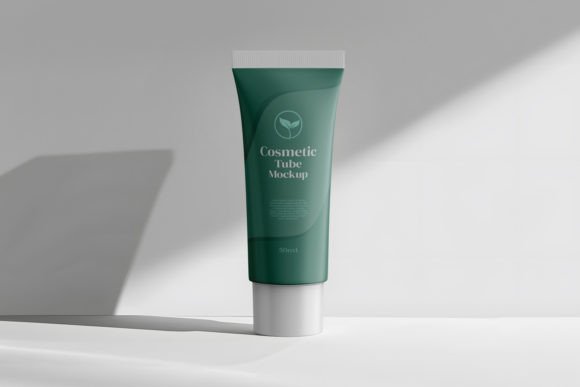
Cosmetic Tube Editable Branding Mockup
In the highly competitive world of beauty and personal care, visual presentation is not merely an aesthetic choice; it is a critical business asset. Before a customer ever touches a product, they judge it by its packaging. This is where the Cosmetic Tube Editable Branding Mockup becomes an indispensable tool for designers, marketers, and brand owners. It bridges the gap between a flat digital concept and a tangible, shelf-ready product, allowing you to visualize your brand identity in a realistic three-dimensional environment without the high costs of physical prototyping.
This premium PSD resource offers more than just a blank canvas. It provides a sleek, modern cosmetic tube design that serves as a professional stage for your creativity. With high-resolution dimensions of 4000 px by 2667 px at 300 dpi, the mockup ensures that every detail of your label design—from typography to texture—is rendered with crystal clarity. For skincare brands launching new serums, cosmetic companies refreshing their visual identity, or freelance designers presenting concepts to clients, this tool streamlines the workflow and elevates the perceived value of the final design.
Why Realistic Visualization Matters in Packaging Design
Designing in a two-dimensional space often leads to surprises when the artwork is finally printed and applied to a curved surface. Colors may shift, logos might distort, and text readability can suffer. Using a Cosmetic Tube Mockup for Branding and Packaging mitigates these risks by providing an accurate preview of how the design interacts with light, shadow, and form.
The human brain processes visual information significantly faster than text. When you present a client or stakeholder with a photorealistic image of their product, you are not just showing them a label; you are selling them a vision of their brand’s future. The realistic feel and design layer conversion features allow for immediate feedback and iteration. Instead of waiting days for a physical sample, you can adjust hues, swap logos, and test different layout structures in minutes using Photoshop’s smart object layers. This agility is crucial in fast-paced markets where time-to-market can determine success.
Unlocking Creative Possibilities with Smart Objects
The core power of this mockup lies in its technical construction. The inclusion of smart object layers means that personalization is seamless. You do not need advanced 3D modeling skills to achieve professional results. Simply double-click the smart object layer, paste your design, save, and watch it automatically wrap around the tube with correct perspective and lighting effects.
This ease of use opens up a wide array of creative applications:
- A/B Testing Designs: Create multiple variations of your packaging to see which color scheme or logo placement resonates best with your target audience before committing to print.
- Seasonal Campaigns: Quickly adapt your existing packaging design for holiday editions, limited-time offers, or special collaborations by swapping out graphical elements while maintaining the structural integrity of the tube.
- Brand Consistency Checks: Place your new design alongside other products in your line to ensure visual harmony across your entire portfolio.
For educators and students in graphic design, this tool serves as an excellent learning resource. It demonstrates how flat graphics translate onto cylindrical forms, teaching important lessons about distortion, highlight placement, and material reflection.
Tailoring the Mockup to Your Audience
Different users have distinct needs, and the versatility of the Cosmetic Tube Editable Branding Mockup allows it to serve various professional contexts effectively.
For Small Business Owners and Entrepreneurs
If you are launching a startup skincare line, budget constraints are a reality. Physical prototyping can be prohibitively expensive. This mockup allows you to create marketing materials, social media posts, and pitch decks that look polished and professional. You can showcase your product on e-commerce platforms like Shopify or Etsy with images that convey quality and trust, helping to convert browsers into buyers.
For Marketing Agencies and Freelancers
Agencies often juggle multiple clients with diverse aesthetics. The ability to quickly customize the tube’s color schemes and graphics means you can adapt the mockup to fit a minimalist organic brand one day and a bold, vibrant makeup line the next. It enhances your portfolio, showing potential clients that you understand the end-to-end process of product presentation.
For Product Designers and Innovators
When developing new formulations, the packaging is part of the user experience. Designers can use this tool to experiment with label hierarchy, ensuring that key information like ingredients and usage instructions is legible and well-placed. It facilitates better communication with manufacturers by providing a clear visual reference of the desired outcome.
Best Practices for Effective Presentation
To get the most out of your Cosmetic Tube Mockup for Branding and Packaging, consider these practical recommendations:
- Maintain High Resolution: Always work with high-quality source files. The 300 dpi resolution of this mockup is designed for print-quality output, so ensure your inserted designs are equally sharp to avoid pixelation.
- Consider Lighting and Environment: While the mockup provides realistic lighting, think about the context in which your product will be viewed. If your brand is eco-friendly, consider placing the mockup in a natural, soft-light setting in your final composite images.
- Keep It Simple: Avoid cluttering the tube with too much text or complex patterns. The sleek design of the mockup works best with clean, modern aesthetics that allow the brand identity to shine.
- Test Readability: Zoom out to view the mockup at thumbnail size, as it would appear on mobile devices. Ensure your logo and product name remain distinct and readable even at smaller scales.
By following these guidelines, you ensure that your presentations are not only visually appealing but also strategically effective. The goal is to make a lasting impression on your audience, whether they are investors, retailers, or end consumers.
Elevating Your Brand Identity
Ultimately, packaging is a silent salesman. It communicates your brand’s values, quality, and personality before a word is spoken. The Cosmetic Tube Editable Branding Mockup from RAM STUDIO provides the platform to refine this communication. It allows you to experiment, iterate, and perfect your design with confidence.
Whether you are unveiling a groundbreaking new serum, refreshing a legacy brand, or designing prototypes for a client, this tool offers the professional edge needed in today’s visual-first marketplace. By leveraging its customizable features and realistic rendering capabilities, you can present your brand’s identity with clarity and impact. Embrace the flexibility of digital prototyping to save time, reduce costs, and create packaging that truly resonates with your audience. In the end, a well-presented design is not just about looking good; it is about building trust and driving engagement in a crowded market.